

launchthat
Multi-Tenant SaaS: One Codebase, Wildly Different Products
Every customer wanted something different. The CRM customer needed contacts. The LMS customer needed courses. We were shipping bloated software that served nobody well. Here is how plugins fixed it.
The first version of our platform was honest in its ambition and terrible in its execution. We tried to build every feature for every customer into one product.
The CRM customer saw a course builder they would never use. The LMS customer saw a product catalog they did not need. The ecommerce customer paid for a support system they had already outsourced. Everyone got an interface where 80% of the features were irrelevant, and everyone paid for features they never touched.
The moment I knew we had a problem was when a customer asked, "Can I hide the modules I don't use?" They were not asking for a new feature. They were asking us to get out of their way.
The problem: one size does not fit all
We had a monolithic core that grew in every direction at once:
- "Let's add a course builder to the CRM!"
- "The ecommerce features should work in the support system!"
- "Can we add Stripe payments to the learning platform?"
Each request made sense in isolation. Together, they created a product that was mediocre at everything and excellent at nothing. Every new feature increased complexity for every customer, whether they wanted it or not.
The codebase reflected this. Business logic for contacts, courses, products, and support tickets lived in the same module tree. Changing one feature risked breaking another because the boundaries were not enforced — they were just folder names.
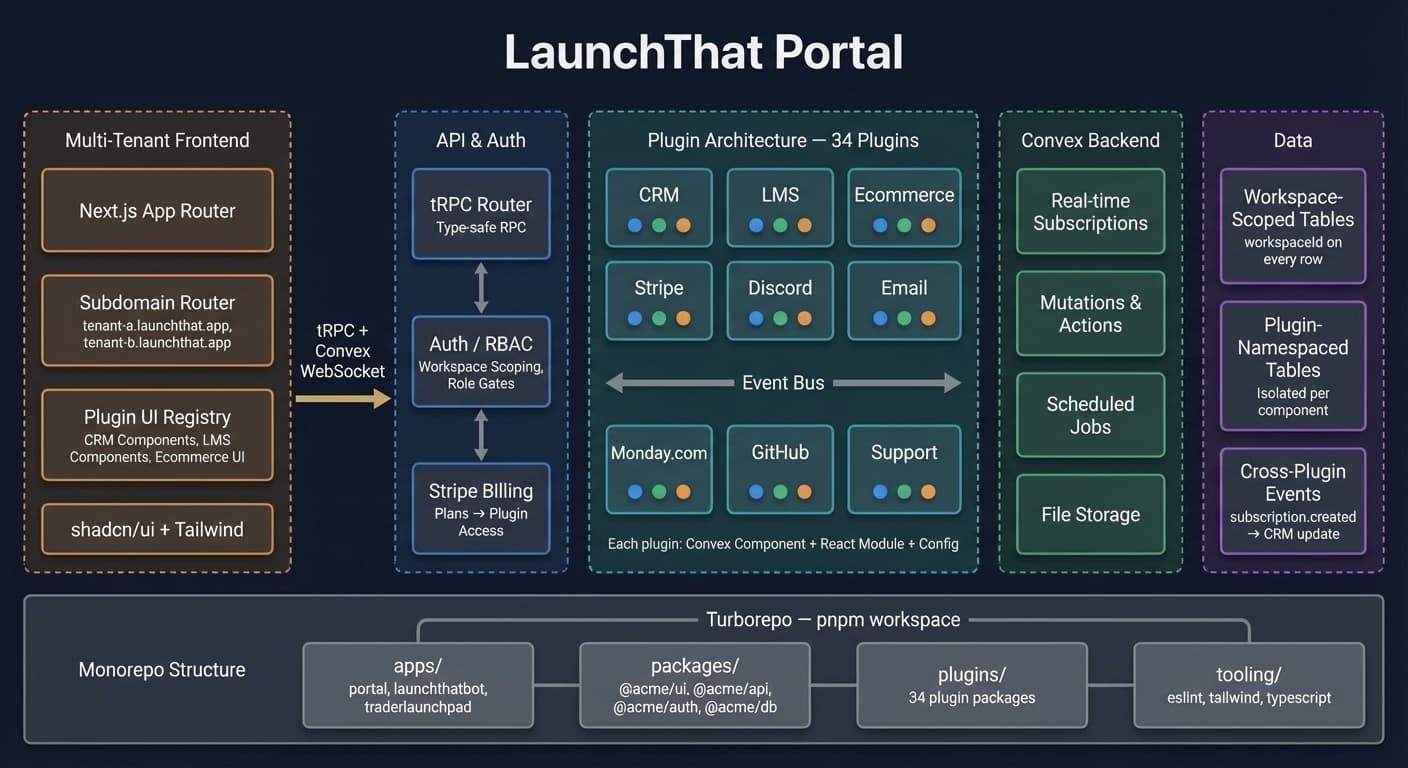
The solution: core + plugins
We split the platform into two layers:
- Core — shared infrastructure that every installation needs (auth, database, API, billing, workspace management)
- Plugins — optional features that extend the core
interface CorePlatform {
  users: UserManagement;
  auth: Authentication;
  billing: Billing;
  workspace: Workspace;
}

interface Plugin {
  name: string;
  mount: (platform: CorePlatform) => void;
  routes?: Route[];
  components?: Component[];
}
A CRM customer installs Core + CRM plugin + Email plugin + Stripe plugin. An LMS customer installs Core + LMS plugin + Quiz plugin + Certificate plugin. Same codebase, different products.
The customer who asked to hide unused modules? Their problem disappeared. There are no unused modules to hide when you only install what you need.
Multi-tenancy at the data layer
Every plugin table includes a workspaceId field:
const contacts = defineTable({
  workspaceId: v.id("workspaces"),
  name: v.string(),
  email: v.optional(v.string()),
  companyId: v.optional(v.id("companies")),
  createdAt: v.number(),
}).index("by_workspace", ["workspaceId"]);
Convex queries automatically filter by workspace using our query helpers. No SQL joins. No manual filtering. The workspace context is injected at the query level, so a CRM plugin in Workspace A never sees data from Workspace B.
This was not just a security decision — it was a sanity decision. In the monolithic version, we had bugs where test data from one workspace leaked into another because a developer forgot a WHERE clause. With enforced workspace scoping, that category of bug is structurally impossible.
Plugin communication through events
Plugins need to talk to each other without knowing about each other. A Stripe payment should update the CRM. An LMS completion should trigger a certificate.
We built an event system:
// Ecommerce plugin emits
await ctx.events.emit("subscription.created", {
  workspaceId,
  customerId,
  plan: "professional",
});

// CRM plugin listens
events.on("subscription.created", async (data) => {
  await contactsTable.insert({
    workspaceId: data.workspaceId,
    source: "stripe",
  });
});
Events are fire-and-forget. Plugins do not know about each other — they just react to what happens. This means we can add a new plugin that listens to existing events without modifying the plugins that emit them.
Plugin installation lifecycle
When a plugin installs into a workspace, we run installation hooks:
export async function onInstall(ctx: InstallationContext) {
  await ctx.db.insert("crm_pipelines", {
    workspaceId: ctx.workspaceId,
    name: "Default Pipeline",
    stages: ["Lead", "Contacted", "Qualified", "Closed"],
  });
  await ctx.access.grant(ctx.workspaceId, "crm.settings");
}
Modular billing
With plugins, billing maps directly to value:
const plans = {
  starter: ["core", "crm", "email"],
  professional: ["core", "crm", "email", "ecommerce", "support"],
  enterprise: ["core", "crm", "email", "ecommerce", "support", "lms", "ai"],
};
Customers upgrade by unlocking plugin combinations. Nobody pays for features they have not enabled. This eliminated the most common objection in our sales process: "I don't need half of what you're charging me for."
What we learned
Get the core right first. If your core does not scale, plugins will not save you. We spent months getting the workspace model right before touching plugins. That investment paid for itself many times over.
Plugin boundaries are hard. Some features want to cross boundaries. We created cross-plugin utilities for shared concerns like tagging, attachments, and comments. Deciding what belongs in the core versus a utility versus a plugin is an ongoing design conversation.
Documentation is half the work. Every plugin needs clear docs for installation, configuration, data model, API surface, and events. We built a plugin SDK that enforces this structure because voluntary documentation never happened consistently.
Test plugins in isolation. Each plugin has its own test suite. Integration tests verify plugins work together, but unit tests catch bugs before they compound.
The multi-tenant architecture is not a feature we ship. It is the foundation that lets us ship one product and let every customer feel like it was built just for them.
Want to see how this was built?
Explore the plugin systemWant to see how this was built?
Browse all posts