

launchthat
Browser Automation at Scale: From Puppeteer Scripts to Production Pipelines
A Puppeteer script that worked locally crashed after 200 pages in production. Memory leaked, sessions corrupted, and the whole thing needed to be rebuilt. Here is what we built instead.
The script was beautiful. Thirty lines of Puppeteer that logged into a dashboard, scraped pricing data from 50 competitor pages, and dumped the results into a spreadsheet. It ran perfectly on my laptop. It ran perfectly on the first 100 pages in production.
Page 201 crashed. Out of memory. The browser instance had been accumulating DOM nodes, event listeners, and leaked references for 200 pages without ever cleaning up. On my laptop, I never noticed because I was scraping 10 pages at a time. In production, the queue fed pages continuously and the memory climbed until the process died.
That was the first lesson: browser automation that works locally is not browser automation that works at scale. Everything about the approach needs to change.
The problem with naive automation
Most browser automation starts the same way:
const browser = await puppeteer.launch();
const page = await browser.newPage();

for (const url of urls) {
  await page.goto(url);
  const data = await page.evaluate(() => {
    return document.querySelector(".price")?.textContent;
  });
  results.push(data);
}
This works for 10 pages. At 1,000 pages, you hit:
- Memory leaks — each page navigation accumulates unreleased resources
- Session corruption — cookies and local storage from previous pages interfere with current pages
- Error cascading — one timeout or crash kills the entire batch
- Rate limiting — sequential requests from one IP get blocked
- No observability — when something fails at page 847, you have no idea why without reading logs line by line
The solution: queue-based pipeline architecture
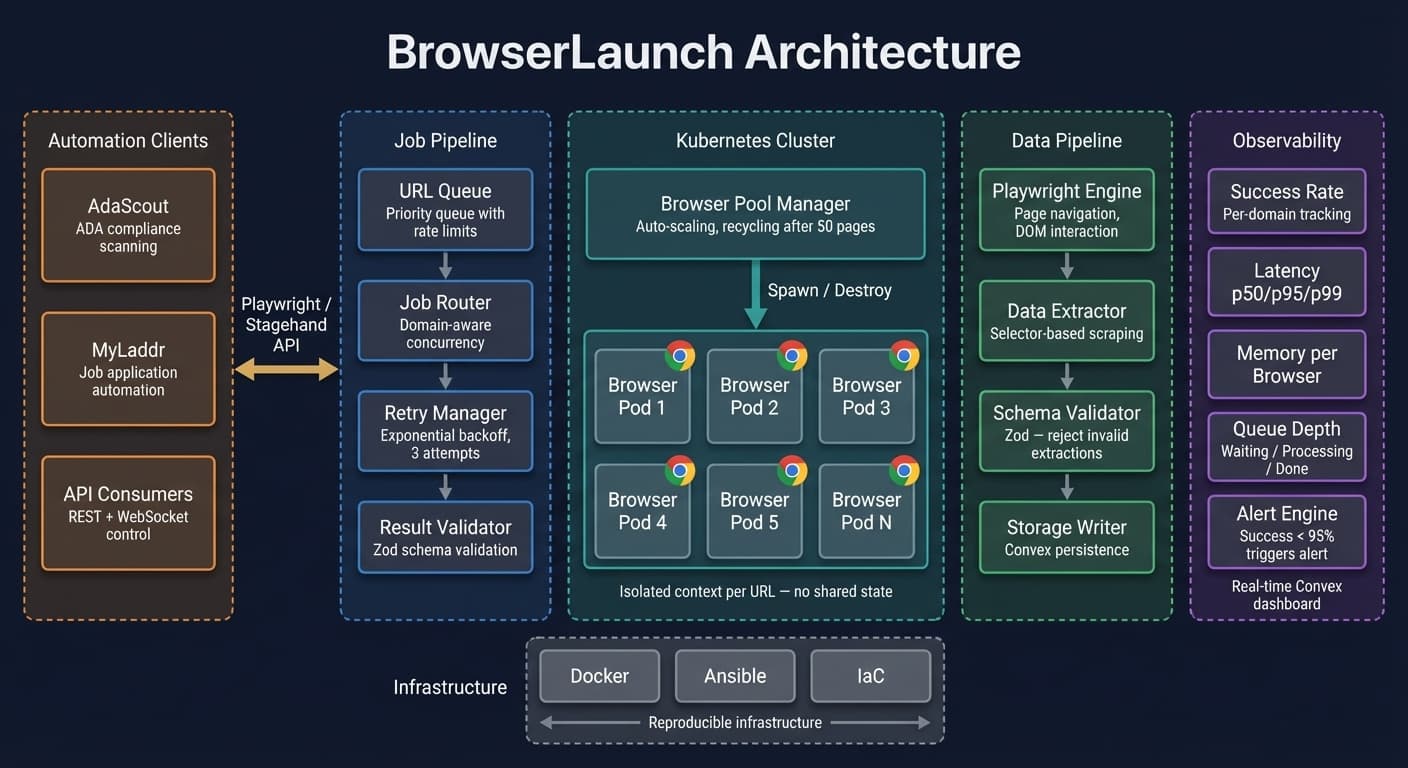
We rebuilt automation as a pipeline with discrete, isolated stages:
URL Queue → Browser Pool → Extraction → Validation → Storage
Browser pool with recycling
Instead of one browser handling everything, we maintain a pool of browser instances that get recycled after a fixed number of pages:
class BrowserPool {
  private pool: Browser[] = [];
  private pageCount: Map<Browser, number> = new Map();
  private maxPagesPerBrowser = 50;

  async acquire(): Promise<Browser> {
    const available = this.pool.find(
      (b) => (this.pageCount.get(b) ?? 0) < this.maxPagesPerBrowser
    );
    if (available) return available;

    const browser = await puppeteer.launch({
      args: ["--disable-dev-shm-usage", "--no-sandbox"],
    });
    this.pool.push(browser);
    this.pageCount.set(browser, 0);
    return browser;
  }

  async release(browser: Browser): Promise<void> {
    const count = (this.pageCount.get(browser) ?? 0) + 1;
    this.pageCount.set(browser, count);

    if (count >= this.maxPagesPerBrowser) {
      await browser.close();
      this.pool = this.pool.filter((b) => b !== browser);
      this.pageCount.delete(browser);
    }
  }
}
After 50 pages, the browser instance is destroyed and a fresh one takes its place. Memory leaks become bounded. Session corruption resets every 50 pages.
Job isolation
Each URL gets its own context:
async function processUrl(pool: BrowserPool, url: string) {
  const browser = await pool.acquire();
  const context = await browser.createBrowserContext();
  const page = await context.newPage();

  try {
    await page.goto(url, { waitUntil: "networkidle0", timeout: 30000 });
    const data = await extractData(page);
    return { url, data, status: "success" };
  } catch (error) {
    return { url, error: String(error), status: "failed" };
  } finally {
    await context.close();
    await pool.release(browser);
  }
}
Fresh browser context per URL. No shared cookies. No shared state. If one page crashes, it does not affect the next one. The finally block ensures cleanup happens regardless of success or failure.
Retry with exponential backoff
Network failures, rate limits, and transient errors are not bugs — they are expected:
async function withRetry<T>(
  fn: () => Promise<T>,
  maxRetries = 3
): Promise<T> {
  for (let attempt = 0; attempt <= maxRetries; attempt++) {
    try {
      return await fn();
    } catch (error) {
      if (attempt === maxRetries) throw error;
      const delay = Math.min(1000 * Math.pow(2, attempt), 30000);
      await new Promise((r) => setTimeout(r, delay));
    }
  }
  throw new Error("Unreachable");
}
Three retries with exponential backoff. Most transient failures resolve on the second attempt. Rate limits usually clear by the third.
Extraction validation
Raw scraping is brittle. We validate extracted data against expected schemas before storing:
const priceSchema = z.object({
  value: z.number().positive(),
  currency: z.enum(["USD", "EUR", "GBP"]),
  source: z.string().url(),
  extractedAt: z.string().datetime(),
});

function validateExtraction(raw: unknown): ExtractionResult {
  const parsed = priceSchema.safeParse(raw);
  if (!parsed.success) {
    return { status: "invalid", errors: parsed.error.issues };
  }
  return { status: "valid", data: parsed.data };
}
If the page layout changes and the price selector returns null, the validation catches it immediately instead of silently inserting bad data.
Monitoring and observability
At scale, you need to know what is happening without watching logs:
- Success rate — percentage of URLs that returned valid data, tracked per domain
- Latency percentiles — p50, p95, p99 processing times per URL
- Error classification — timeout vs network error vs validation failure vs rate limit
- Memory tracking — per-browser-instance memory usage over time
- Queue depth — how many URLs are waiting vs processing vs complete
We built a dashboard that shows all of this in real-time using Convex subscriptions. When the success rate drops below 95%, we get an alert. When a specific domain starts rate limiting, we see it immediately and can adjust concurrency.
What we learned
Browser automation is infrastructure, not scripting. A Puppeteer script is a prototype. A production automation pipeline needs pooling, isolation, retry logic, validation, and monitoring. The script is 5% of the work.
Respect rate limits. Getting blocked by a target site is not a technical problem — it is a relationship problem. We throttle requests per domain, rotate user agents, and respect robots.txt. Burning bridges with aggressive scraping is not worth the short-term data.
Test with production volumes locally. Our "works on my machine" problem was entirely because we tested with 10 URLs. Running a local test with 500 URLs would have caught the memory leak immediately.
Plan for the page to change. Selectors break. Layouts shift. A/B tests change the DOM. Every extraction should validate its output. Silent failures compound into databases full of garbage.
The gap between "I can scrape a page" and "I can reliably scrape 10,000 pages" is the same gap as between a prototype and a product. The automation that works at scale looks nothing like the script you started with.
Want to see how this was built?
See LaunchThatBotWant to see how this was built?
Browse all posts