

launchthat
3D in the Browser: What Actually Works and What Does Not
We embedded a Spline scene in our trading dashboard. The first version ran at 12fps on a MacBook Air. Here is how we shipped 3D that users actually enjoyed instead of endured.
The trading platform needed something that looked different from every other crypto dashboard. The usual approach — dark theme, neon accents, TradingView charts — blends into a sea of identical products.
We decided to add 3D elements. A rotating model on the hero section, interactive visualizations for portfolio breakdowns, animated transitions between views. The design was ambitious and the first implementation was a disaster.
The problem: 3D that murders performance
The initial Spline scene loaded a 4.2MB model, initialized a WebGL context, and started rendering at 60fps. On my M2 MacBook Pro, it looked fantastic. On a 2020 MacBook Air — the kind of machine a significant portion of our users actually have — the page loaded in 6 seconds and the scene ran at 12fps.
The fan spun up. The battery drained. Users who came to check their portfolio left because the page was unusable.
This is the core tension of browser 3D: the technology is capable of impressive visuals, but the average user's hardware is not capable of rendering them without compromise.
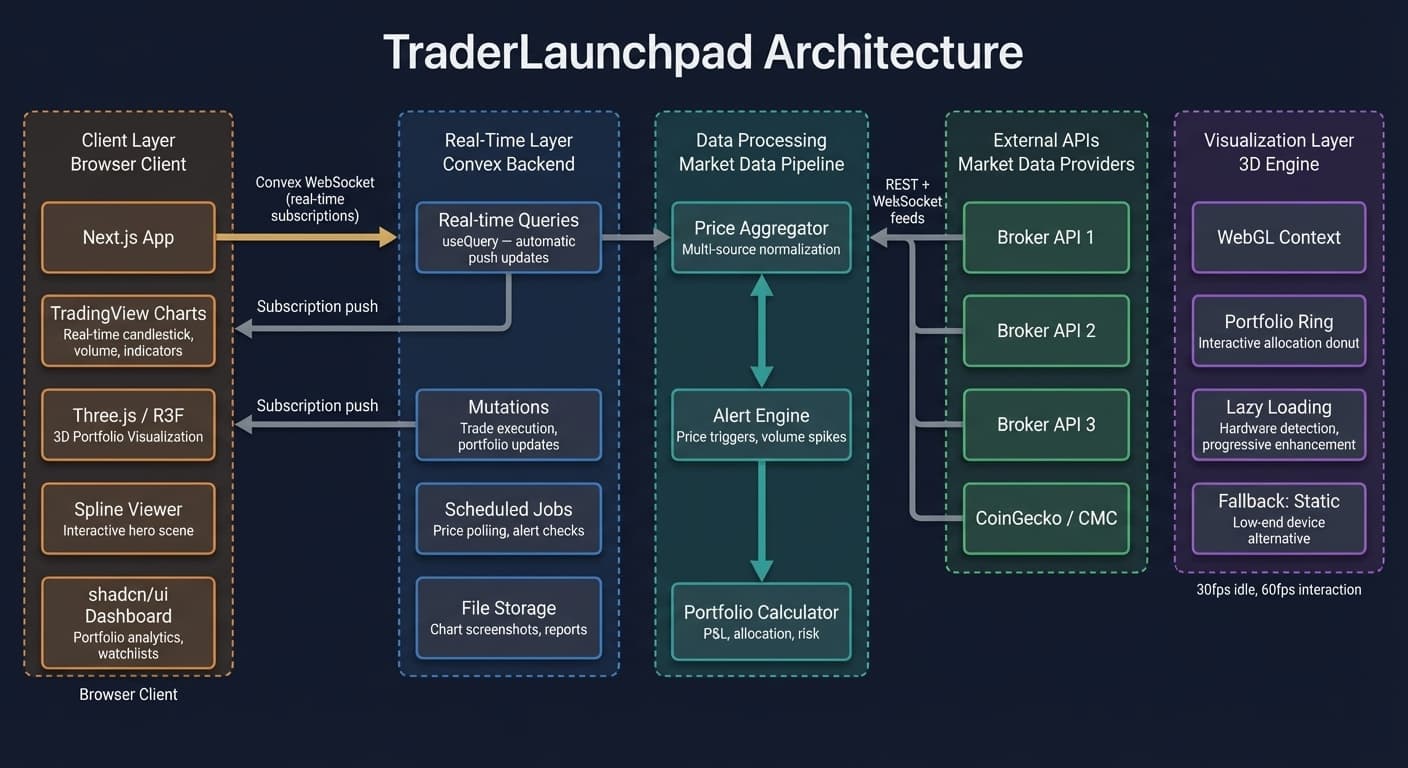
The solution: lazy loading and progressive enhancement
We restructured the 3D integration around a simple principle: 3D is an enhancement, not a dependency. The page works without it. When hardware can handle it, the experience is better. When it cannot, nothing breaks.
Lazy loading the viewer
"use client";

import { lazy, Suspense } from "react";

const SplineViewer = lazy(() =>
  import("@splinetool/react-spline").then((m) => ({ default: m.default }))
);

export function HeroSpline() {
  return (
    <Suspense fallback={<div className="h-screen bg-[#09070f]" />}>
      <SplineViewer scene="https://prod.spline.design/..." />
    </Suspense>
  );
}
The Spline runtime is not in the main bundle. It loads after the page is interactive. The fallback is a styled div that matches the scene's background color, so there is no layout shift.
Hardware detection
Before initializing WebGL, we check what the device can handle:
function canRender3D(): boolean {
  const canvas = document.createElement("canvas");
  const gl = canvas.getContext("webgl2") || canvas.getContext("webgl");
  if (!gl) return false;

  const debugInfo = gl.getExtension("WEBGL_debug_renderer_info");
  if (!debugInfo) return true;

  const renderer = gl.getParameter(debugInfo.UNMASKED_RENDERER_WEBGL);
  const isLowEnd = /SwiftShader|llvmpipe|Mesa/i.test(renderer);
  return !isLowEnd;
}
If the device is running software rendering (SwiftShader, llvmpipe), we skip the 3D scene entirely and show a static image. No degraded experience — just a different one.
Asset optimization
The 4.2MB model was the biggest problem. We reduced it to 800KB through:
- Mesh simplification — reducing polygon count by 60% with imperceptible visual difference
- Texture compression — switching to KTX2 format for GPU-native decompression
- Animation baking — converting procedural animations to keyframe data that loads faster
The scene now loads in under 1 second on a fast connection.
Where we use 3D now
Portfolio hero
This site's hero section uses a Spline scene that loads lazily. It sets a visual tone without blocking the content below it.
Trading platform
The trading dashboard uses lightweight 3D elements for portfolio visualization — a rotating allocation ring that users can interact with to explore their holdings. It supplements the standard chart views, it does not replace them.
Interactive demos
Product pages embed interactive 3D previews of plugin configurations. Users rotate and explore before installing. This increased plugin adoption by 23% compared to static screenshots.
The tradeoffs we accepted
- No 3D on mobile. Mobile GPUs vary wildly. Rather than shipping a degraded experience, we show optimized static alternatives.
- No complex physics. Physics simulations are expensive. We use CSS and Framer Motion for most interaction feedback and reserve WebGL for visual complexity.
- Accessibility first. Every 3D element has an equivalent non-visual description. Screen readers get content. Keyboard navigation works on all interactive elements.
What we tell teams considering browser 3D
Start with the fallback. Design the page without 3D first. Make sure it works, looks good, and loads fast. Then add 3D as a layer on top. If the 3D fails to load, nobody notices.
Measure on real hardware. Your development machine is not representative. Test on a $300 Chromebook and a 3-year-old phone. If it does not work there, it does not work for a significant portion of your users.
Budget the GPU. 3D, video, complex CSS animations, and map renderers all compete for the same GPU resources. If your page has a 3D hero and a map widget and animated charts, something is going to stutter.
The browser can do impressive 3D now. The question is not "can we?" but "should we, and at what cost?" The answer, in our experience, is yes — as long as you build it as an enhancement that gracefully disappears when the hardware cannot keep up.
Want to see how this was built?
See the trading platformWant to see how this was built?
Browse all posts